Boot and install Linux.
No USB stick.
Keep a library of ISOs and virtual disks right on your hard drive, and boot or install any of them directly. The convenience of a virtual machine, running on real hardware at full speed.
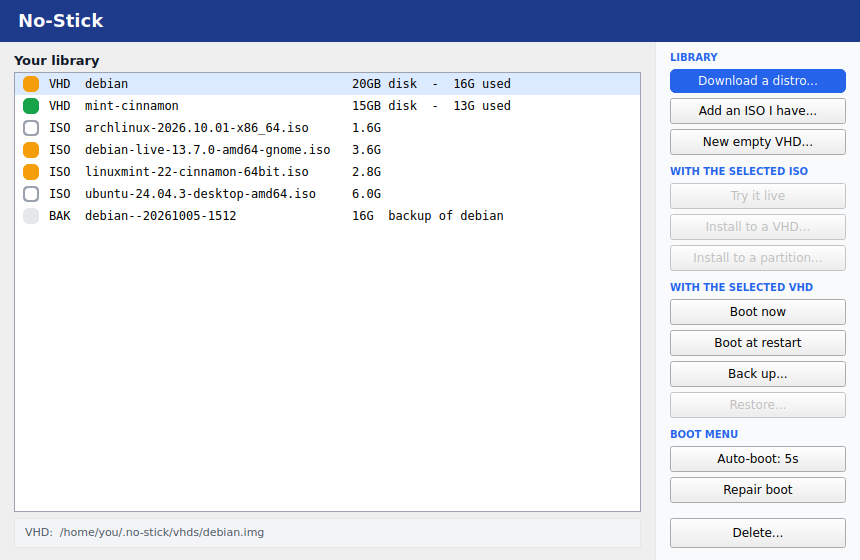
Keep a library of ISOs and virtual disks right on your hard drive, and boot or install any of them directly. The convenience of a virtual machine, running on real hardware at full speed.
Installing an OS usually means burning a USB stick and rebooting, or running it slowly in a VM forever. No-Stick does neither.
Download one from the community catalogue, or point at an ISO you already have.
The distro's own installer runs in a quick, safe VM and installs into a disk-image file. Minutes, not reboots.
Tick it into the No-Stick boot menu, then boot it at the next restart, or jump straight into it now. It runs on bare metal - full speed, all your hardware.
Boot an ISO without installing anything, straight from your hard drive. New in this release, for Ubuntu, Mint, Debian and Arch ISOs.
A full, real install inside a file. Make as many as you like - each is just a file you can copy, back up or delete.
Windows and your current Linux stay exactly where they are. No partitions are created, resized or removed.
Tick what appears in the menu, choose a default, and set a timer to boot it automatically. Or use Boot now to restart into a disk in seconds.
Debian 13, Linux Mint 22 and Fedora 41 install and boot today, and Ubuntu uses the same method. Arch is experimental; the immutable distros are next.
MIT licensed and free, forever. Built with Visualised - the whole app is two readable files, so you can read exactly what it does before you run it.
Free and open source. Runs on Ubuntu, Mint, Debian and similar with the GRUB boot menu.
curl -fsSL https://github.com/wallisoft/no-stick/releases/latest/download/install.sh | bashInstalls into your home folder, with the Visualised runtime it needs. Run it from your app menu, or no-stick in a terminal. Windows is not supported yet.